
Why Pinterest Can Transform Your Business Growth
When it comes to how to boost a Pinterest business account, you’re not just working with another social media platform—you’re tapping into a powerful visual search engine with incredible staying power.
Pinterest stands apart in the digital marketing landscape because it’s driven by findy, not conversation. While your Instagram post might vanish from feeds within hours, a well-crafted pin can continue bringing traffic to your site for months or even years. This evergreen quality is pure gold for businesses looking for sustainable growth.
What makes Pinterest truly special is user intent. People don’t come to Pinterest to chat or catch up—they come ready to plan, shop, and find solutions. As Global Web Index research confirms, “The #1 reason people use Pinterest is to find new products and brands.” These aren’t casual browsers; they’re actively seeking inspiration with their wallets ready.
The platform also boasts a user base with higher household incomes compared to other social channels. These users aren’t just window shopping—they’re serious about making purchases. One savvy marketer leveraged this advantage to grow their website traffic by an astonishing 829% in just three months through strategic Pinterest marketing.
To harness this potential, your Pinterest strategy needs to be thoughtful and targeted. Converting to a business account gives you access to powerful analytics and advertising tools. Profile optimization with strategic keywords helps users find your content. Creating high-quality vertical pins (ideally 1000×1500px) with clear text and consistent branding helps you stand out in feeds.
Consistency matters too—posting regularly keeps your content fresh and visible. Most successful accounts post 3-5 pins daily, often using scheduling tools to maintain this cadence without burnout. And don’t underestimate the power of Pinterest SEO—using topic tags and keyword-rich descriptions helps the platform connect your content with interested users.
The key to continuous improvement? Analyzing performance through Pinterest analytics. By tracking metrics like impressions, clicks, and saves, you can refine your approach based on what resonates with your audience.
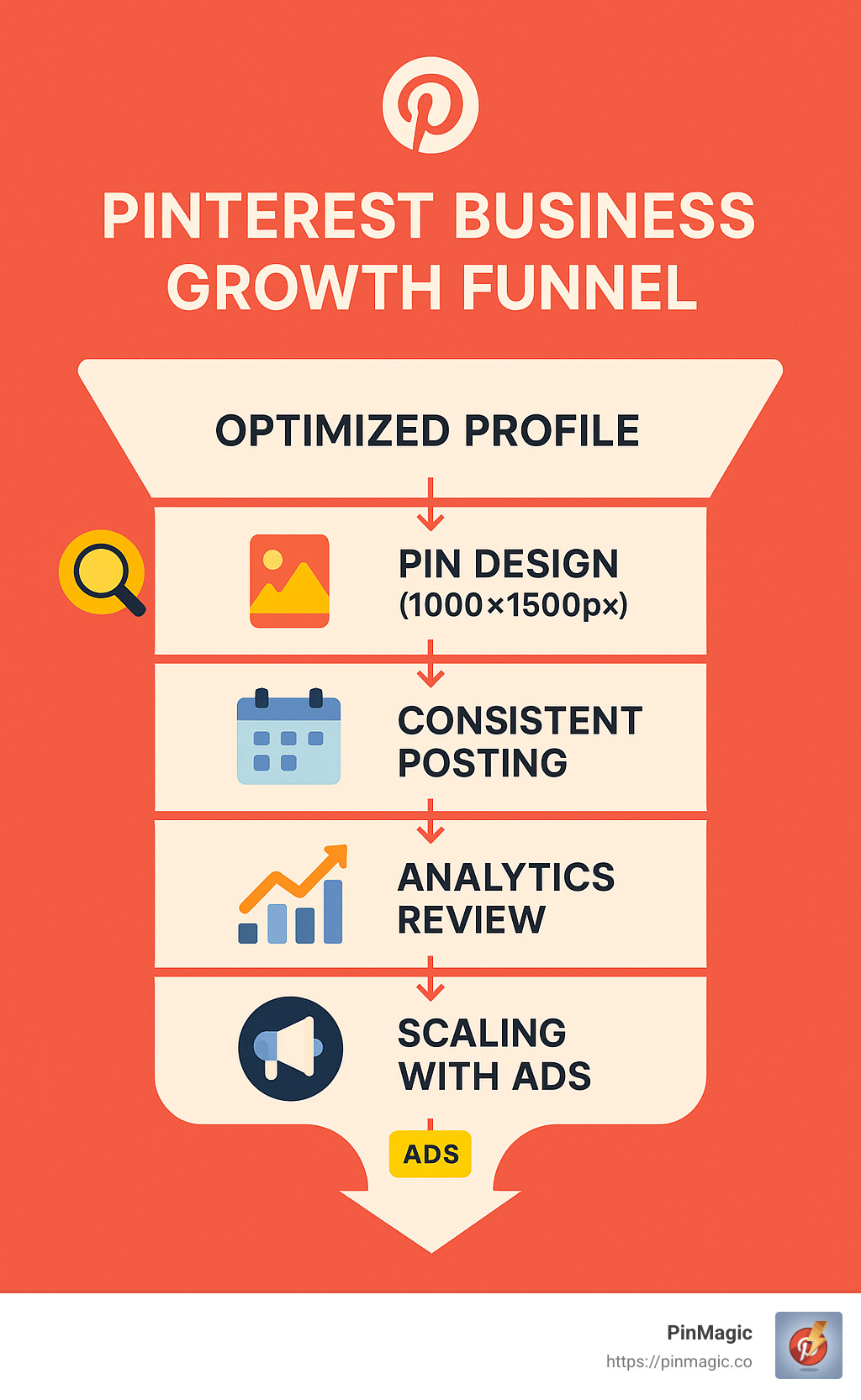
Whether you’re just getting started or looking to breathe new life into an existing account, the strategies we’ll explore in this guide will help transform your Pinterest presence from basic to business-driving. The platform’s unique combination of search-driven findy, shopping intent, and evergreen content makes it a powerhouse for sustainable business growth—if you know how to use it right.
What Makes a Pinterest Business Account Different?
Before diving into growth strategies, it’s important to understand what separates a Pinterest business account from a personal one. This distinction is crucial for anyone serious about how to boost a Pinterest business account.
Think of a Pinterest business account as upgrading from a bicycle to a car – you’re still heading to the same destination, but you’ve got a lot more horsepower to get there!
A business account open ups powerful tools that personal accounts simply don’t have access to. While personal accounts are perfect for planning your dream kitchen renovation or collecting outfit inspiration, business accounts are built specifically to help you grow and measure your success.
| Feature | Personal Account | Business Account |
|---|---|---|
| Analytics | No | Yes – detailed insights on audience and performance |
| Ad capabilities | No | Yes – create and manage ad campaigns |
| Rich Pins | No | Yes – auto-syncs info from your website |
| Website verification | No | Yes – build credibility and track referrals |
| Audience insights | No | Yes – see demographic data on followers |
| Verified Merchant status | No | Yes – eligible for shopping features |
“A business account gives you access to ads, analytics and custom audience insights. It’s free to sign up and you set your own ad budget,” explains Pinterest in their business resources.
The analytics alone are worth their weight in gold. Instead of wondering if your content is resonating, you’ll know exactly which pins are driving traffic and which ones need a refresh.
Why You Must Switch Before You Scale & how to boost a pinterest business account
Here’s the thing – if you’re using Pinterest for commercial purposes, switching to a business account isn’t just a good idea—it’s actually required by Pinterest’s Terms of Service.
Pinterest makes this pretty clear: “If you want to use Pinterest for commercial purposes you must create a business account and agree to our Business Terms of Service. More simply put… if you are using Pinterest for work, you need to set up a business account.”
But beyond just staying on Pinterest’s good side, there are compelling reasons to make the switch if you want to grow:
Free professional tools transform your Pinterest strategy from guesswork to data-driven decisions. You’ll see exactly which pins are performing well and which audience segments are engaging with your content.
Credibility boost comes from having a verified website and professional profile. This signals to potential customers that you’re the real deal, not just another random pinner.
Ad capabilities become immediately available when you’re ready to put some budget behind your pins. This allows you to scale quickly when you find content that resonates.
Rich Pins automatically sync information from your website to your pins, keeping product details, article headlines, or recipe ingredients up-to-date without manual intervention.
Shreya Dalela, who achieved that impressive 829% traffic growth mentioned earlier, didn’t just get lucky – she strategically leveraged these business-exclusive features to maximize her results.
The best part? Switching to a business account costs exactly zero dollars. It’s a free upgrade that immediately opens doors to professional-level growth potential.
Setting Up or Converting Your Profile for Success
Whether you’re creating a new business account or converting an existing personal one, proper setup is critical for long-term success. Let’s walk through the process and best practices to boost your Pinterest business account from day one.
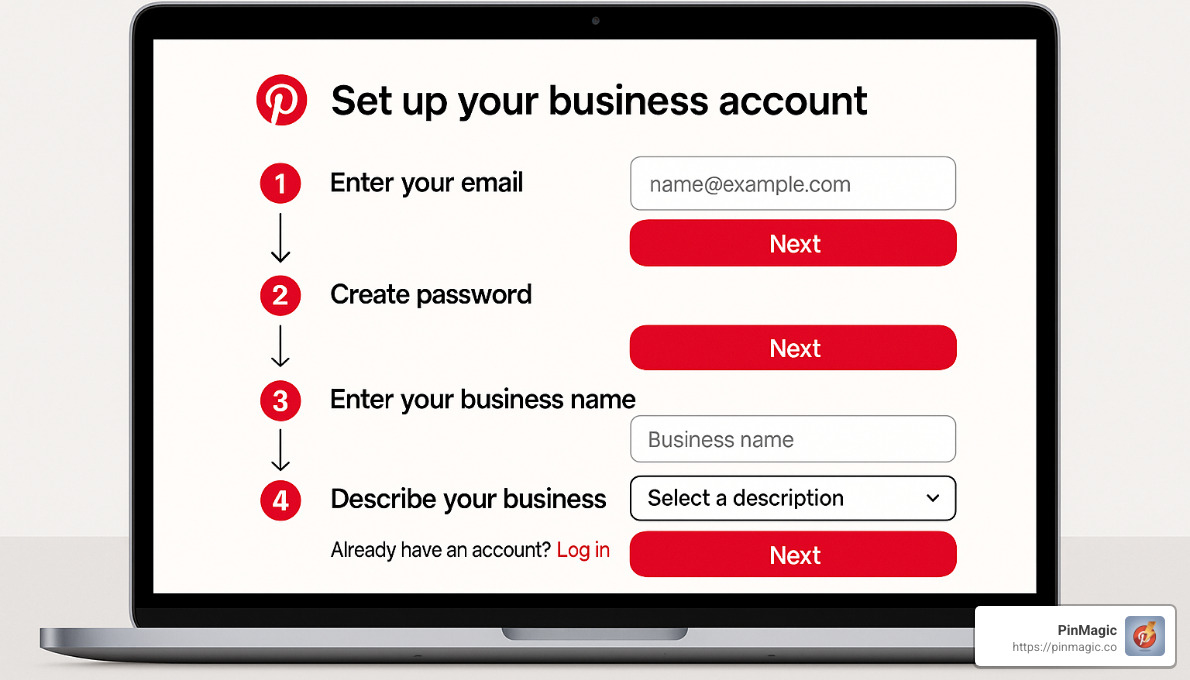
Creating a New Business Account
Starting fresh with Pinterest? The process is straightforward but deserves your full attention. Head over to business.pinterest.com and click that “Sign up” button to begin your journey. You’ll need to enter your email, create a password, and confirm your age – standard stuff.
What really matters comes next: crafting your business profile. This is where the magic begins! When choosing your business name, it’s not just an identifier – it’s a searchable element. Include relevant keywords that your target audience might use to find businesses like yours.
Your business description deserves special care too. Think about how your ideal customers might search for solutions you provide. Weave those phrases naturally into your description, focusing especially on the first couple of sentences since they’ll be most visible on mobile devices.
Don’t stress about the advertising question during setup – you can always enable or disable this feature later as your strategy evolves.
Converting an Existing Personal Account
If you’ve been pinning personally and have built up a following that aligns with your business interests, converting makes much more sense than starting from zero. The process is refreshingly simple.
Log into your personal account, click your profile picture in that top-right corner, and select “Settings.” From there, steer to “Account settings” where you’ll find the option to “Convert to business account.” After clicking “Continue,” you’ll be guided through completing your business profile.
Nina, a Pinterest marketing expert who’s helped clients achieve impressive 5× returns on ad spend, offers this golden advice: “Keep boards relevant to your niche and set personal boards to secret instead of deleting.” This approach preserves your personal collections while presenting a professional face to the world.
Fast Conversion Checklist to how to boost a pinterest business account
After establishing your business presence, there are several critical steps to complete that will dramatically improve your visibility and credibility.
First, claim your website by navigating to Settings > Claim and entering your URL. You’ll need to verify ownership using either an HTML tag or file upload method. Once submitted, approval typically takes about 24 hours. This step is crucial as it establishes your official connection to your website and enables rich pins functionality.
Next, optimize your profile with intention. Upload a professional logo that matches your branding across platforms for instant recognition. Your bio should be keyword-rich but natural-sounding, with special attention to those first two lines that are most visible on mobile devices. Include your website link prominently, and create a visually appealing banner that instantly communicates what your brand is about.
Don’t skip the important step of auditing your boards. This means keeping only business-relevant boards public while setting personal or unrelated boards to “secret.” This doesn’t delete them – they’ll remain accessible to you but invisible to others. Only delete boards you truly don’t want for any purpose. Consider organizing your public boards in order of relevance or seasonality to create a logical flow for visitors.
If you sell products, applying for Verified Merchant status opens up powerful shopping features. This verification process builds trust with potential customers and allows you to upload your product catalog to create shoppable pins – turning browsers into buyers.
As one Pinterest expert perfectly summarizes: “Cutesy or clever titles are fine for personal pages but now that you’re using a Pinterest business account it’s wise to optimize your content for search.” This principle should guide every element of your profile setup.
According to scientific research on visual branding, consistency across your Pinterest presence strengthens recognition and trust – essential elements for converting casual browsers into loyal customers.
Profile, Board & Pin SEO: The Non-Negotiables
Let’s cut through the fluff: Pinterest isn’t social media—it’s a visual search engine. Understanding this fundamental truth is crucial when learning how to boost a Pinterest business account.
Just as you would optimize your website for Google, every element of your Pinterest presence needs to be optimized for Pinterest’s search algorithm. This means strategic keyword placement throughout your profile.

Key Areas for Keyword Optimization
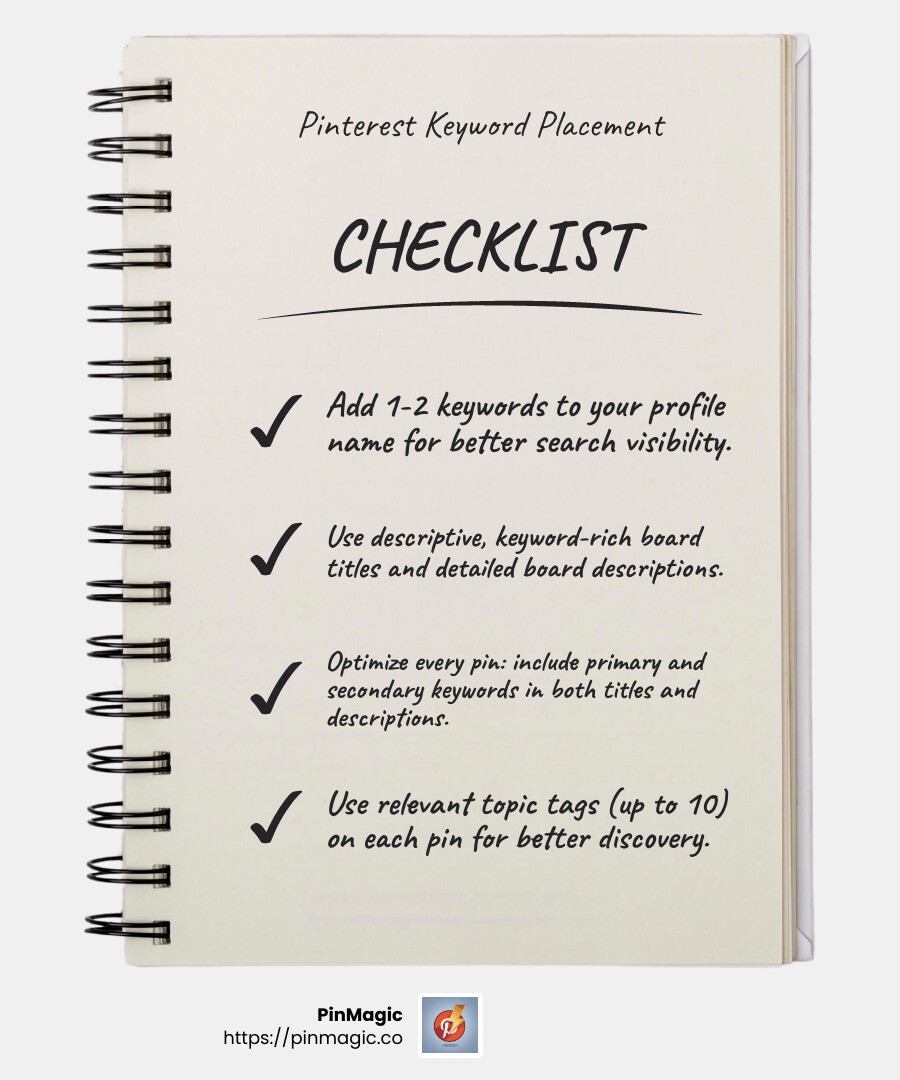
Think of your Pinterest profile as prime real estate where every space matters. Your Profile Name isn’t just for identification—it’s your first SEO opportunity. Include your business name plus 1-2 relevant keywords, like “PinMagic | Pinterest Marketing Tools.” This immediately tells both users and the algorithm what you’re all about.
Your Profile Bio deserves special attention. Front-load it with important keywords, especially in those first two lines that are visible on mobile. Something like “Pinterest marketing tools for creators and businesses. Analytics, keyword research, and data extraction to boost your Pinterest strategy” works beautifully.
When it comes to Board Titles, clarity trumps creativity every time. That “Yummy Stuff” board might seem cute, but “Healthy Breakfast Recipes” will actually get found in search. Similarly, transform “Dream Spaces” into “Modern Living Room Design Ideas” to capture people actively searching for interior design inspiration.
Don’t neglect your Board Descriptions! Include 5-7 relevant keywords in natural-sounding sentences. For instance: “Easy healthy breakfast recipes that are quick to make, perfect for busy mornings. Find nutritious smoothie bowls, overnight oats, and protein-packed options.”
Moving to individual pins, your Pin Titles should include your primary keyword front and center. “5 Ways to Boost Your Pinterest Business Account Today” clearly signals what value users will get.
Pin Descriptions are your opportunity to weave in multiple keywords naturally. Use one main keyword and about four supporting keywords in helpful, conversational text. For example: “Learn how to boost your Pinterest business account with these proven strategies. Increase your Pinterest traffic, improve pin engagement, optimize your boards, and leverage Pinterest SEO to grow your audience.”
Finally, don’t forget Topic Tags—Pinterest’s preferred alternative to hashtags. You can add up to 10 hidden topic tags per pin that categorize your content without cluttering descriptions. For a marketing pin, consider tags like #pinterestmarketing, #pinteresttips, and #pinterestforbusiness.
Keyword Research Workflow (Free & Paid Tools)
Finding the right keywords feels like a treasure hunt—exciting and rewarding when you strike gold. Start where it’s simplest: Pinterest’s search suggestions. Type a broad term in Pinterest’s search bar and watch the magic happen as auto-suggestions appear. These aren’t random—they’re actual terms people search for!
Take your research up a notch with Pinterest Trends at trends.pinterest.com. This free tool lets you compare search volume for different terms and identify seasonal trends, helping you plan content when interest peaks.
Don’t reinvent the wheel—analyze competitors who are already crushing it. Study successful pins in your niche and note which keywords they use repeatedly. Look at their best-performing boards for inspiration on both content and keyword strategies.
For a serious advantage, leverage PinMagic’s keyword tools. Our browser extension lets you extract keywords from high-performing pins with just one click. You can analyze multiple pins simultaneously to identify patterns and generate related keywords based on top-performing content.
As one Pinterest marketing expert who achieved 10 million monthly viewers puts it: “Mastering Pinterest SEO—the art of optimizing every pixel of your presence for Pinterest’s algorithm—changed everything for my business.”
Pinterest users often search with long-tail keywords (3+ word phrases) that show high intent. Rather than simply searching “cake recipes,” they’ll type “easy chocolate cake recipe for beginners” or “gluten-free birthday cake ideas.” These specific queries signal exactly what they want—and give you the perfect opportunity to provide it.
Content That Ranks & Converts
Creating visually appealing, search-optimized pins is at the heart of how to boost a Pinterest business account. The right content strategy can dramatically increase your reach, engagement, and click-through rates.
Pin Design Fundamentals
Pinterest is a visual platform, so your pin design truly matters. Think of each pin as your digital storefront window – it needs to catch eyes and invite people in.
The ideal pin size is 1000×1500 pixels with a 2:3 vertical ratio. This vertical orientation takes up more screen space and naturally performs better than square or horizontal images. I’ve seen clients double their engagement simply by switching from square to vertical pins!
Visual clarity is non-negotiable. Use high-quality images with good lighting and maintain sufficient contrast between text and background. A cluttered pin is like a cluttered store – people walk right past it. Keep it clean and instantly understandable.
Your text overlay should communicate value immediately. Stick to 1-2 fonts maximum and make sure they’re large enough to read on mobile. Most Pinterest browsing happens on phones! Your headline should answer the “what’s in it for me?” question that every pinner is silently asking.
Don’t forget your branding elements. Pinterest recommends: “Put a logo on every pin that you make, but keep it subtle. Avoid the lower-right corner, since that spot gets covered up by our product icons.” Consistent colors and a recognizable visual style help build brand awareness over time.
Designing High-Performing Pins that Boost a Pinterest Business Account
Beyond the basics, there are advanced design strategies that can significantly level up your Pinterest game.
Create multiple variations of each pin. Design 2-3 different versions for the same content, testing different images, headlines, and layouts. I love doing this with clients because it’s like running a mini focus group – the Pinterest algorithm will tell you exactly which design resonates most with your audience!
Lifestyle imagery works wonders on Pinterest. Rather than showing isolated product shots, show products in use. A travel mug in someone’s hand while hiking performs better than a plain product shot. Home decor in a styled room outperforms items on white backgrounds. People want to envision how your offerings fit into their lives.
Step-by-step visuals are Pinterest gold. Breaking down processes visually – like recipe pins showing ingredients, process, and final result – gives people a reason to save your pin for later. It also establishes you as a helpful authority in your niche.
Don’t limit yourself to standard static pins. Experiment with different formats like video pins (6-15 second clips that autoplay), idea pins (multi-page content similar to Stories), and carousel pins (multiple images users can swipe through). Each format has its strengths – videos are great for demonstrations, while idea pins get preferential treatment in the Pinterest algorithm.
One of my favorite success stories is a bridal wear retailer who saw a 5× return on ad spend simply by testing multiple pin designs and focusing on lifestyle imagery of real brides wearing their dresses in authentic settings. That authentic, aspirational quality is what makes Pinterest users click and buy.
Posting Cadence & Automation
Consistency beats intensity on Pinterest. A steady drip of quality content will outperform sporadic bursts of activity every time.
At minimum, aim to post 3-5 fresh pins weekly. Quality matters more than quantity, but consistent posting signals account activity to the algorithm. Think of it as keeping the conversation going with your audience – disappear for too long, and they might forget about you.
Batch creation is your secret weapon for maintaining consistency without burning out. Set aside a few hours each month to design 10-20 pins at once, write descriptions in advance, and prepare a month’s content. This approach is much more efficient than scrambling to create pins on the fly.
Strategic scheduling helps your pins reach the right audience at optimal times. While Pinterest’s algorithm doesn’t heavily favor specific posting times like some platforms, spreading pins throughout the week rather than posting all at once gives each pin room to breathe and perform. For seasonal content, plan 45-60 days in advance – Pinterest users start searching for holiday ideas months before the actual event!
Don’t forget about the power of evergreen reposting. Unlike other platforms where reposting the same content is frowned upon, Pinterest actually rewards strategic repinning of your best content. Space out repins by at least 2-4 weeks, vary descriptions with different keywords each time, and pin to different relevant boards to reach new audiences.
As Pinterest marketing expert Catie Marques Teles puts it: “While you can determine the best schedule for you, posting on a weekly basis is a good rule of thumb. Because content is evergreen, your hard work works harder, and people will keep seeing your ideas over time.”
Using PinMagic’s analytics features, you can quickly identify your best-performing pins and prioritize creating similar content or repinning those pins to additional relevant boards. This data-driven approach takes the guesswork out of your Pinterest strategy and ensures you’re focusing your energy where it counts.
Measure, Refine & Scale with Ads
Once you’ve established your organic Pinterest strategy, it’s time to measure performance, refine your approach, and consider scaling with ads. This data-driven approach is essential to boost your Pinterest business account effectively.
Understanding Pinterest Analytics
Pinterest provides robust analytics for business accounts. Here’s what to focus on:
-
Impressions: How many times your pins were seen
- Indicates reach and visibility
- Low impressions may signal keyword or content issues
-
Saves: How many users saved your pins to their boards
- Demonstrates content quality and relevance
- Saves help amplify your content to new audiences
-
Clicks: How many users clicked through to your website
- Directly relates to traffic generation
- Low clicks despite high impressions may indicate misleading pins
-
Engagement rate: Total engagements (clicks & saves) ÷ total impressions
- Helps compare performance across pins
- Industry average is around 2-3%
-
Audience insights: Demographics and interests of your followers
- Helps tailor content to your actual audience
- May reveal unexpected interest categories to explore
“If there’s a pin with a lot of saves, the system will recommend it across the platform’s main pages over other less inspiring, less engaging content,” explains Pinterest, highlighting why tracking these metrics matters.
Reading the Numbers & Troubleshooting Growth Plateaus
If your Pinterest growth stalls, here’s how to diagnose and address common issues:
-
Low impressions:
- Problem: Your pins aren’t being shown to enough people
- Solutions: Improve keyword optimization, create fresh pins, join relevant group boards
-
High impressions but low clicks:
- Problem: Your pins attract attention but don’t inspire action
- Solutions: Strengthen your call-to-action, ensure pin content matches destination, improve pin design
-
Keyword mismatch:
- Problem: You’re targeting keywords that don’t match user intent
- Solutions: Research trending topics in your niche, analyze competitor keywords, use Pinterest Trends
-
Creative fatigue:
- Problem: Your pin designs look too similar or dated
- Solutions: Refresh your templates, test new formats (video, carousel), study current design trends
-
Board SEO gaps:
- Problem: Your boards aren’t optimized for findy
- Solutions: Rename boards with keyword-rich titles, add detailed descriptions, organize pins logically
One food blogger who saw their traffic plateau used PinMagic to analyze their best-performing pins, identified a pattern of recipe step-by-step images outperforming final dish photos, and adjusted their strategy accordingly. Within two months, their Pinterest traffic increased by 22,000%.
Smart Ad Formats for Rapid Growth
When you’re ready to accelerate growth, Pinterest ads offer several effective formats:
-
Quick Promote: The simplest way to boost existing pins
- Right from your profile, select a pin and click “Promote”
- Set daily budget and duration
- Choose between broad reach or targeted audience
- Best for: Testing which pins perform well with paid promotion
-
Ads Manager: More advanced campaign creation
- Select from multiple campaign objectives:
- Brand awareness
- Video views
- Consideration
- Conversions
- Catalog sales
- Choose from various ad formats:
- Standard pins
- Video pins
- Carousel pins
- Collections
- Shopping ads
- Set manual bids and detailed targeting
- Best for: Sophisticated campaigns with specific goals
- Select from multiple campaign objectives:
-
Strategic Ad Approaches:
- Idea Ads: Multi-page format ideal for tutorials or multi-step processes
- Shopping Ads: Showcase products with pricing and availability
- Retargeting: Show ads to users who’ve visited your website
- Look-alike Audiences: Reach new users similar to your existing customers
“69% of weekly Pinterest users say ads on the platform feel relevant to them, which is 30% higher than what weekly users on competing platforms say,” according to Pinterest research. This receptiveness to ads makes Pinterest an especially effective platform for paid promotion.
A home decor retailer used Pinterest’s shopping ads to showcase their products in lifestyle settings and achieved a 20× increase in customer inquiries compared to their previous social media advertising efforts.
Frequently Asked Questions about Pinterest Growth
How often should I pin per week?
If you’re wondering about the ideal posting schedule for Pinterest, you’re not alone! This is one of the most common questions I hear from creators looking to boost their Pinterest business account.
The truth is, there’s no one-size-fits-all answer, but I can share some evidence-based guidelines that work for most businesses:
Starting out, aim for at least 3-5 pins weekly. This modest frequency keeps your account active and signals to Pinterest that you’re consistently creating content. Even at this minimal level, quality should never be sacrificed for quantity.
When you’re ready to accelerate growth, stepping up to 15-25 pins per week (roughly 3-4 daily) provides enough volume for Pinterest’s algorithm to learn what works for your audience. This middle ground is perfect for testing different content types while maintaining quality standards.
For established accounts with substantial content libraries, you might consider posting up to 10 pins daily—but only if you can maintain exceptional quality and relevance. As Pinterest expert Nina wisely advises, “Don’t compromise on the quality of your pins to meet a certain posting frequency.” I’ve seen businesses struggle after prioritizing quantity over quality, and it rarely ends well!
Which metrics matter most for ROI?
While it’s easy to get caught up in vanity metrics like follower counts or total impressions, three key metrics directly tie to your bottom line when trying to boost a Pinterest business account:
Outbound clicks deserve your closest attention as they represent actual website visitors—the people who found your pin compelling enough to click through. For paid campaigns, calculating your cost-per-click helps you understand exactly what you’re paying for each visitor.
Conversion rate takes this a step further by measuring the percentage of those Pinterest visitors who complete your desired actions once on your site. This requires proper tracking setup with UTM parameters, but provides invaluable insight into the quality of your Pinterest traffic.
Revenue attribution completes the picture by connecting actual sales to your Pinterest efforts. By comparing Pinterest’s performance against other traffic sources, you’ll get a clear view of its ROI for your business.
I recently worked with an e-commerce seller who used PinMagic to identify their highest-converting pin types. By refocusing their strategy on what was actually driving sales (not just saves or impressions), they achieved a remarkable 5× increase in Pinterest-attributed revenue within just three months!
Are Rich Pins still worth the setup?
Absolutely, positively yes! Rich Pins remain one of the most underused tools for those looking to boost a Pinterest business account. They automatically sync information from your website to your pins, creating a seamless experience for users while saving you countless hours of manual updates.
Depending on your content, you’ll want to implement:
- Article Pins that display your headline, author name, and description
- Product Pins showing real-time pricing, availability, and product details
- Recipe Pins featuring ingredients, cooking times, and serving information
The benefits extend far beyond convenience. Rich Pins significantly boost your credibility since the verified information signals trustworthiness to potential customers. They also improve user experience by providing key details without requiring a click, which means the people who do click through are more qualified and informed.
Perhaps most valuable is the automatic updating feature—when you change information on your website (like product pricing or article titles), your pins update accordingly without any manual work on your part.
Yes, the initial setup involves adding metadata to your website and applying for approval through Pinterest. But trust me, this one-time effort pays dividends for years to come. As Pinterest themselves point out, Rich Pins “help people see more information about your idea right on your Pin, which can lead to higher quality clicks and conversions.” In my experience, that’s an understatement!
Conclusion
Growing a successful Pinterest presence isn’t something that happens overnight. Boosting your Pinterest business account is more like tending a garden—it requires consistent care, strategic planning, and patience to see your efforts blossom into real results.
Throughout this guide, we’ve walked through everything from setting up your business account properly to mastering Pinterest SEO and creating pins that both catch eyes and drive clicks. The beauty of all this work? Unlike other platforms where your content disappears into the void after a day or two, Pinterest keeps delivering returns over time.
Think about it: that pin you create today could still be driving traffic to your website three years from now. This compounding effect is what makes Pinterest such a powerful tool for businesses willing to invest the time to do it right.
When you approach Pinterest as the visual search engine it truly is—not just another social network—you open up its full potential. By carefully selecting keywords for your profile, boards, and pins, you’re essentially planting seeds that will grow into a forest of findy opportunities.
And don’t forget—the data tells the story. Those analytics aren’t just pretty numbers; they’re your roadmap to what’s working and what needs adjustment. When something performs well, don’t just celebrate—replicate that success with similar content. When something falls flat, it’s not a failure but a valuable lesson about what your audience doesn’t respond to.
At PinMagic, we’ve seen businesses transform their online presence through thoughtful Pinterest strategy. Our browser extension makes it easier to gather those crucial insights with just one click, helping you identify winning patterns and generate strategic keywords without the usual headaches of manual research.
Pinterest success builds momentum. The first few months might feel slow as the algorithm learns about your content, but stay consistent. Those early pins are teaching Pinterest who you are and who should see your content. Give the process time to work its magic.
Whether you’re a small creative business or a major brand, the principles remain the same: create value-focused content, optimize everything for search, post consistently, analyze your results, and scale what works. Your Pinterest business account can become one of your most valuable marketing assets—a 24/7 traffic machine that continues working for you long after you’ve created the content.
Ready to see what Pinterest can do for your business? Start implementing these strategies today, and consider giving PinMagic a try to accelerate your growth through smarter, data-driven decisions. Your future self will thank you for the traffic and customers that your Pinterest efforts bring in month after month, year after year.